I really love your work. May I ask a question? I’m wondering how this CrossHatching technique is achieved.
I’ve tried many methods, but it’s difficult to replicate your effect: the lines are well connected yet vary in length, with full coverage, yet without any fragmented lines at all.
This tool has been my #1 used online asset for my 2 years and running Errant game.
Do you think you might make something similar but specifically just "battlemap zones" of less rooms + a few obstacles? Either way, this has been a lifesaver in time for my campaign.
Maybe I'll try implementing something more convenient later, but it's not a "mobile-first" app. It is designed to work with a large screen, a mouse and (optionally) a keyboard. Everything else is just an afterthought.
Hey, I was wondering if it's possible to have the gridlines show up on underwater maps. It'd be easier for DMs like me to not have to manually add the gridlines afterward.
I don't think you understood me. I was asking if there's an option to toggle the gridlines to show through the water. When I set the water level to 1.0 (100% water), there won't be any gridlines showing. But if I adjust the water level, the gridlines will appear only on the "dry" parts.
Hi Watabou! Just wanted to let you know that I created a small Foundry module. It's basically only your maps, walled, with some journal entries. For now, I only used 5 maps generated by 1PD, but I plan on doing more, also using other genarators. Cave/Glade and Dwellings would fit right in, I think.
Sorry, that's not possible. There are no such things as individual rooms or corridors, no pre-made assets that could be extracted. Everything is created on the fly and drawn as part of the whole dungeon.
Okay here's a technical question for you on your "non doors" code. I thought I had this particular door case cracked but maybe not.
My approach was to draw these doors using two rectangles. In this example, my left rectangle would just emulate the corridor. The shape fill is the same color as the floor and the right side line is the same as the walls.
Then I was going to draw a second rectangle for the right side but realised it needs to be transparent (or something) to display the hatching underneath BUT also not show the corridor.
Can you please go into a little bit of detail in terms of the door algorithm you used to achieve this. Am I on the right track?
In this case there is only one left rectangle. There is no right rectangle (which should be the same as having a transparent right rectangle if you need it for some reason), so the hatching is not obscured. There is no explicit corridor underneath all this, so I don't need to care about showing/not showing it. The whole cell is a corridor and a door at the same time.
Thanks bro. In my code I draw one door and rotate it depending on its properties in the json:
door.dir.x is horizontal (left or right facing) door.dir.y is vertical (up or down facing)
So if you were to turn doors off in your code, is this sort of what you'd expect a map to look like?
To achieve something that even closely resembles what you you have made I need to draw doors over the walls that mask what . It's a pain but I also love learning this stuff.
Anywho. The more I tinker with this, the more admirable I find your attention to detail and the skill needed to pull it all off elegantly. Even the Dyson hatching and the seed generation method. Hot dang it's cool. I'm guessing you're an old school Flash Dev :)
A question. Could you add support for ?notes=off to the request string?
For some reason adding ?notes=off actually seems to work on Firefox SOMETIMES but not all the time and I have no idea why. Ideally there is a way for me a way to download the dungeon png without notes + the json for the same dungeon.
The "notes" parameter (or anything of this kind) is not currently supported. The last selected notes mode is saved locally, so it may sort of "work" in one browser but not in another - you have selected different modes in different browsers. If you need to download maps without notes, all you have to do is to select "Notes > Off" once and that's it. No more notes until you changed it.
Excellent generators! Thanks for the hard work and allowing the free use of your products. I just hate that it refreshes with a tap. I had a map I really wanted, tapped the screen to try to save it, and that refreshed it, map gone forever! I'll have to be more careful...
The generator is not optimised for mobiles. The idea was that you wouldn't be able to do much on a small screen anyway, so the only easily accessible operation is the most important one - generating a new map.
← Return to generator
Comments
Log in with itch.io to leave a comment.
Is there a legend for the symbols on the map?
https://dysonlogos.blog/2013/12/23/the-key-to-all-this-madness/ (the generator use only a few of them)
I really love your work. May I ask a question? I’m wondering how this CrossHatching technique is achieved.
I’ve tried many methods, but it’s difficult to replicate your effect: the lines are well connected yet vary in length, with full coverage, yet without any fragmented lines at all.
My method is described here: https://www.patreon.com/posts/hatching-in-1pdg-31716880. I've improved it since then but the core idea remains the same.
Thank you very much for your reply. I can’t believe I didn’t realize there was already a dedicated article about it. Thanks again!
This tool has been my #1 used online asset for my 2 years and running Errant game.
Do you think you might make something similar but specifically just "battlemap zones" of less rooms + a few obstacles? Either way, this has been a lifesaver in time for my campaign.
You can request a map with fewer rooms by selecting the "small" tag.
Since I don't use battlemaps myself, I don't think I'm qualified enough to make a generator for them :)
Can we get better mobile controls? I'd prefer a menu I can just press instead of having the dungeon generated when I hit the screen by accident
Maybe I'll try implementing something more convenient later, but it's not a "mobile-first" app. It is designed to work with a large screen, a mouse and (optionally) a keyboard. Everything else is just an afterthought.
Hey, I was wondering if it's possible to have the gridlines show up on underwater maps. It'd be easier for DMs like me to not have to manually add the gridlines afterward.
Sure 👍
I don't think you understood me. I was asking if there's an option to toggle the gridlines to show through the water. When I set the water level to 1.0 (100% water), there won't be any gridlines showing. But if I adjust the water level, the gridlines will appear only on the "dry" parts.
No, I get it. What I meant is this will be fixed in the next update.
Ah gotcha. Thanks for the clarification. Looking forward to the next update then
Hi Watabou! Just wanted to let you know that I created a small Foundry module. It's basically only your maps, walled, with some journal entries. For now, I only used 5 maps generated by 1PD, but I plan on doing more, also using other genarators. Cave/Glade and Dwellings would fit right in, I think.
Thank you so much for all you do!
hi there, I’ve made a small donation as I love this program. I use it just about every day to play a quick solo d&d game
Is it possible to download the individual rooms and corridors so I can create a dungeon myself?
Sorry, that's not possible. There are no such things as individual rooms or corridors, no pre-made assets that could be extracted. Everything is created on the fly and drawn as part of the whole dungeon.
No worries, thanks for the reply
You might like DungeonScrawl for this. It's not generated, but it's easy to use. The free version lets you do plenty, but cannot export at 100 px.
thank you for the suggestion
I’d like to generate a random dungeon one room at a time but I really like the layout of this dungeon generator
Okay here's a technical question for you on your "non doors" code. I thought I had this particular door case cracked but maybe not.
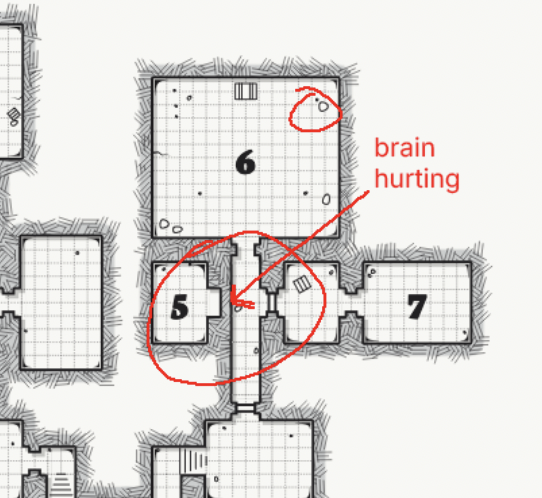
My approach was to draw these doors using two rectangles. In this example, my left rectangle would just emulate the corridor. The shape fill is the same color as the floor and the right side line is the same as the walls.
Then I was going to draw a second rectangle for the right side but realised it needs to be transparent (or something) to display the hatching underneath BUT also not show the corridor.
Can you please go into a little bit of detail in terms of the door algorithm you used to achieve this. Am I on the right track?
Also whats the smarts / thinking behind bits of rubble etc. I freaking love it.
In this case there is only one left rectangle. There is no right rectangle (which should be the same as having a transparent right rectangle if you need it for some reason), so the hatching is not obscured. There is no explicit corridor underneath all this, so I don't need to care about showing/not showing it. The whole cell is a corridor and a door at the same time.
Thanks bro. In my code I draw one door and rotate it depending on its properties in the json:
door.dir.x is horizontal (left or right facing)
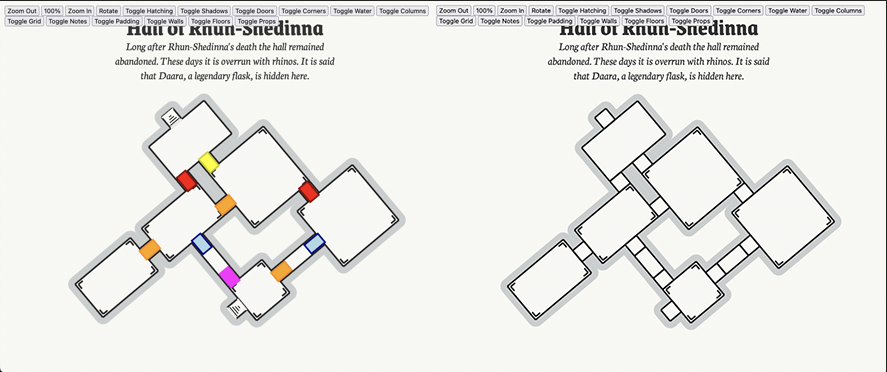
door.dir.y is vertical (up or down facing)
So if you were to turn doors off in your code, is this sort of what you'd expect a map to look like?
To achieve something that even closely resembles what you you have made I need to draw doors over the walls that mask what . It's a pain but I also love learning this stuff.
Anywho. The more I tinker with this, the more admirable I find your attention to detail and the skill needed to pull it all off elegantly. Even the Dyson hatching and the seed generation method. Hot dang it's cool. I'm guessing you're an old school Flash Dev :)
Hey waabou. Greetings and hope you're well.
A question. Could you add support for ?notes=off to the request string?
For some reason adding ?notes=off actually seems to work on Firefox SOMETIMES but not all the time and I have no idea why. Ideally there is a way for me a way to download the dungeon png without notes + the json for the same dungeon.
https://watabou.github.io/one-page-dungeon/?notes=off&tags=compact,small,square,cramped&export=png
Hi Dan!
The "notes" parameter (or anything of this kind) is not currently supported. The last selected notes mode is saved locally, so it may sort of "work" in one browser but not in another - you have selected different modes in different browsers. If you need to download maps without notes, all you have to do is to select "Notes > Off" once and that's it. No more notes until you changed it.
Thanks man. This would be quite a nifty feature for me but its not really necessary :-)
I was wondering what is the maximum width/height for each dungeon size (small, medium, large)?
There is no maximum width/height. Small, medium and large refer to the number of rooms.
Interesting! Is there a range for the number of rooms for each dungeon size?
Excellent generators! Thanks for the hard work and allowing the free use of your products. I just hate that it refreshes with a tap. I had a map I really wanted, tapped the screen to try to save it, and that refreshed it, map gone forever! I'll have to be more careful...
The generator is not optimised for mobiles. The idea was that you wouldn't be able to do much on a small screen anyway, so the only easily accessible operation is the most important one - generating a new map.
Cheers!
Could we have larger dungeon maps with more rooms? Maybe a Huge, Enormous, Labyrinth settings ?